
Goodbye "Use Mac Preview for Now": Antigravity 2.28.0 Brings Built-in PDF Viewer and Browser
Antigravity desktop v2.28.0 is here with a built-in PDF viewer and side-panel browser, allowing developers to inspect artifacts and documentation without window switching.
On October 27, Google Antigravity rolled out v2.28.0 for desktop.
While the changelog enumerates 19 improvements and 15 bug fixes, two marquee additions genuinely reshape daily workflows: a built-in PDF viewer and an integrated side-panel browser. The two actions that previously forced developers to switch away from agent conversations can now be completed directly in the right panel.
1. Built-in PDF Viewer: Kevin Hou's Promise Delivered
First up is the update that feels most personal: the Built-in PDF viewer.
Back on September 21, I was using Antigravity to translate and typeset a 24-page PDF guide (grok-bot-guide-cn.pdf). The task required repeated adjustments to cover cropping and bottom margins.
At the time, the workflow was jarring. Each time the agent finished running a script, it produced a .pdf file pill in chat and listed the file in the Files Changed pane, but clicking or right-clicking produced no reaction whatsoever. For every layout iteration, I had to exit Antigravity, open Finder, and preview the PDF in macOS Preview.
Frustrated, I recorded an 18-second clip, posted it on X, and tagged @Google Antigravity in Chinese:
"Could you tell me how to preview a PDF file inside Antigravity?"
To my surprise, Antigravity product lead Kevin Hou (@kevinhou22) replied directly in Chinese that afternoon with nine words:
"Coming soon. For now, use Mac Preview."
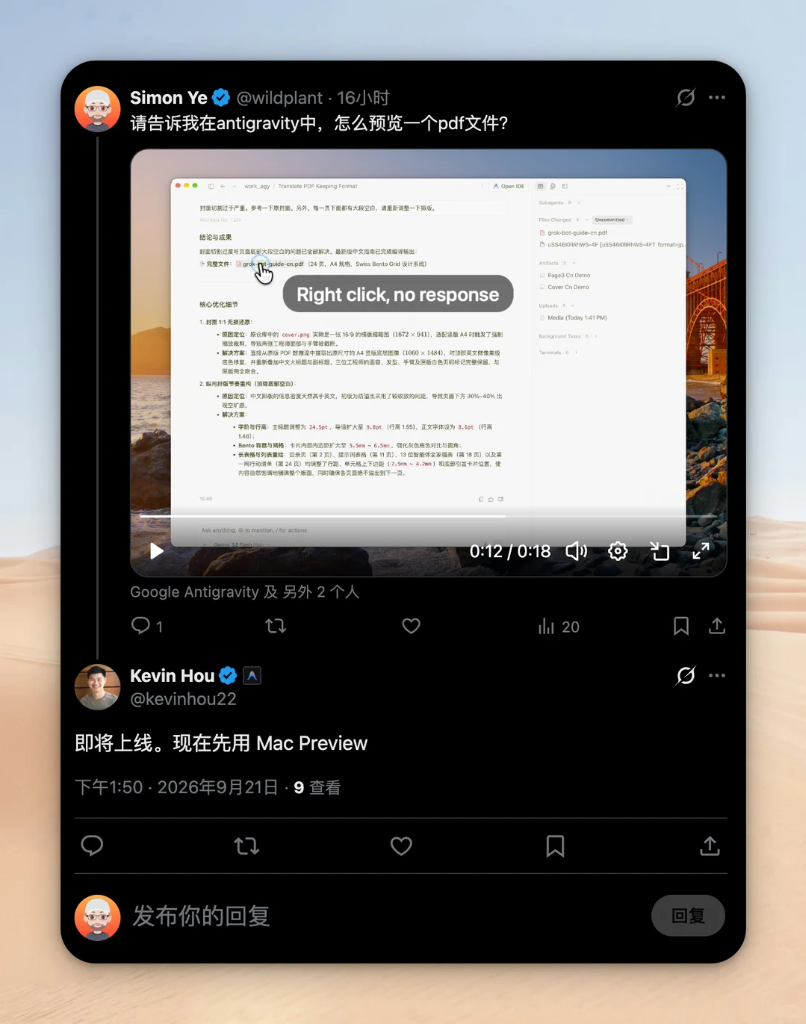
A little over a month later, that promise arrived in v2.28.0:
"PDF files now open in a built-in PDF viewer, both in the file viewer and when an artifact is a PDF, so you can read them without leaving Antigravity."
No more jumping out to "use Mac Preview for now." Whether you click a .pdf file in the File Viewer or receive a PDF artifact generated by an agent, it renders right inside the Antigravity right pane. Combined with v2.27.0's fix for missing Mermaid diagrams in PDF exports, verifying generated PDFs is now a completely closed loop inside the desktop app.
2. Built-in Browser: Click Links in Side Panel Without Mobile Shrinkage
The second major addition is the Built-in browser. In the official live stream mid-month where Kevin Hou teased upcoming browser improvements, 2.28.0 officially introduces it into the Side Panel.
In daily use, three refinements stand out:
- Auto-expanding panel width: Many built-in browsers feel cramped because narrow sidebars trigger mobile responsive breakpoints. Antigravity automatically expands the right panel when opening web links, preserving clean desktop layouts.
- Default internal view with right-click external escape: Clicking links in conversation opens them in the side browser by default (with HTTPS certificate inspection in the address bar). Need your system browser instead? Simply right-click the link to choose an external window, or adjust the default under
Settings > General > Open Links In. Cmd + Shift + Ttab restoration: With web pages, PDFs, and code sharing tabs in the side panel, accidental closures happen. HittingCmd + Shift + T(orCtrl + Shift + Ton Windows/Linux) restores recently closed side tabs right where they were, preserving your scroll position.
3. Notable Polish and Bug Fixes
Alongside the viewer and browser, several subtle updates in 2.28.0 improve everyday stability:
- Any file attachment up to 20 MB: Dropping video clips, design mocks, or raw binary files into chat is no longer rejected—any file under 20 MB can now be attached for agent inspection.
- Word and character level diff highlighting: Code review diffs highlight specific words and characters modified within a line, rather than turning the entire line solid red or green.
- Subagent permission persistence: Fixed an annoying issue where permissions granted as
Always allowin the primary conversation were repeatedly re-prompted when delegated to subagents. - CJK punctuation bold rendering: Fixed formatting regressions where bold or italic markers adjacent to Chinese, Japanese, or Korean punctuation left raw
**asterisks exposed in chat. - Model retention across restarts: Fixed a bug where restarting the client or reconnecting caused active conversations to switch models unexpectedly.
From the integrated browser to the native PDF viewer, Antigravity's recent focus is clear: ironing out the friction points of artifact verification so developers can remain focused in flow.
Have you updated to 2.28.0? How is the built-in browser and PDF preview working for your workflow?