
Antigravity v2.21.1: Conversation Content Search & Automations
Antigravity v2.21.1 is released: search conversation contents with Cmd+K, Scheduled Tasks revamped as Automations with Run Now and prompt creation, collapsible agent actions, and bug fixes.
Google Antigravity has rolled out its v2.21.1 update, marked as Latest in the official release notes, featuring 9 improvements and 14 bug fixes.
As noted by the team, the rollout is gradual and may take a few days to reach all users. If you haven't received the Cmd+K content search or Automations yet, it will arrive shortly.
While there are no new frontier models in this update, anyone managing dozens of daily agent threads will notice the difference immediately: conversation history is now searchable by message content, Scheduled Tasks have evolved into Automations, and repetitive agent actions are neatly collapsed into a single line.
Here is a breakdown of what's new.
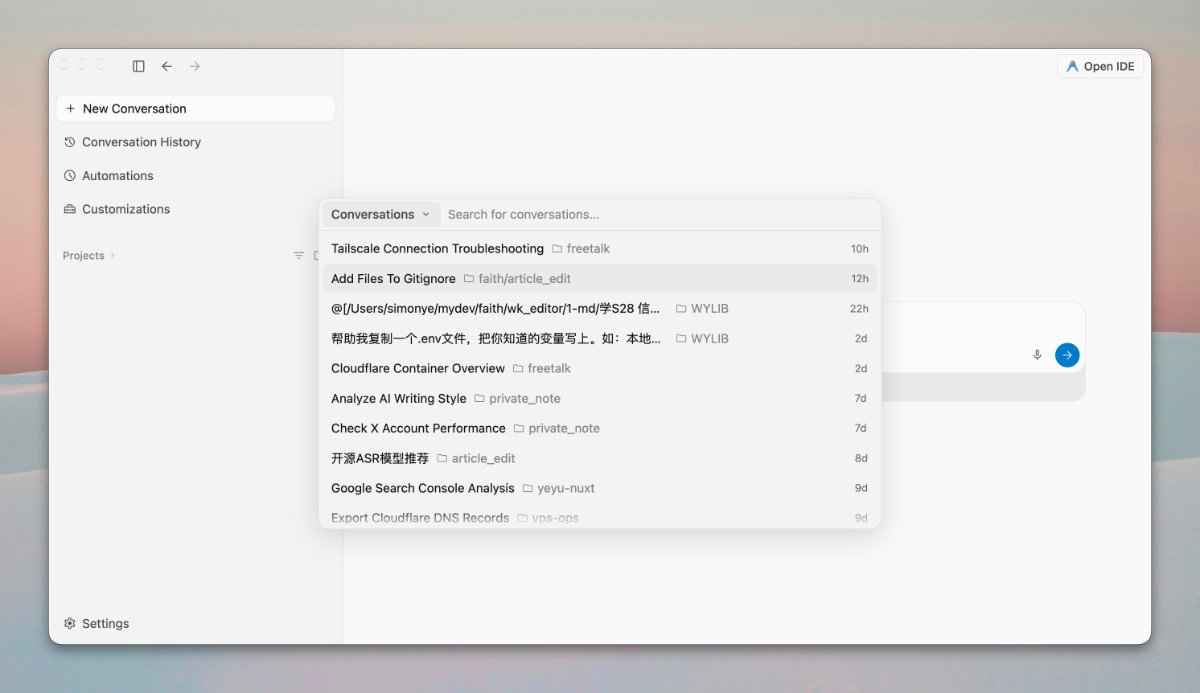
1. Cmd+K: Full-Text Conversation Search
Press ⌘+K (or Ctrl+K on Windows) to open the search modal. Typing any keyword now queries the full content of your conversations, not just auto-generated titles.
Key highlights from the search interface:
- Results show the enclosing workspace/project (e.g.,
freetalk,private_note) alongside relative timestamps (10h,2d). - The top-left
Conversationsdropdown allows toggling between conversations, projects, files, and commands. - Because agent conversation titles are generated automatically and hard to recall precisely, querying by message content solves a major navigation bottleneck.
📌 Practical Example If you previously had an agent troubleshoot a tricky network error and only recall a snippet of the error message, you can now search the snippet directly instead of scrolling through history.
Additionally, archived conversations now retain their status and last updated timestamps, with clear (Archived) markers in sidebar titles to avoid navigation confusion.
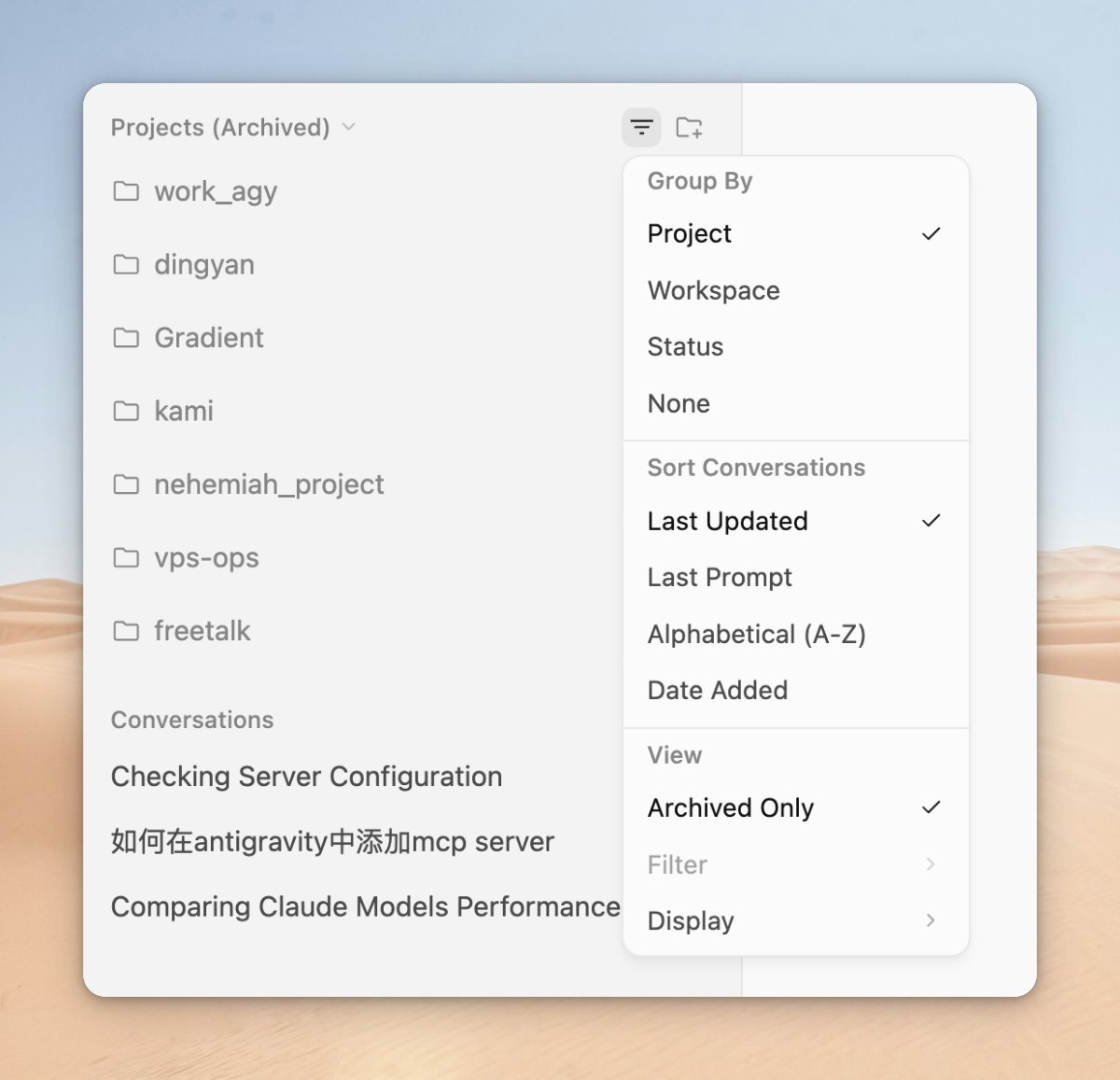
2. Scheduled Tasks Renamed to Automations
The previous "Scheduled Tasks" tab is now Automations. Beyond the name change, two key capabilities have been added:
- Run Now: Trigger any scheduled automation immediately without waiting for its scheduled execution time. Ideal for testing newly created tasks or fetching ad-hoc reports.
- Create with Prompt: Skip manual form configuration—describe what you need in natural language, and let the agent guide you through building the automation step by step.
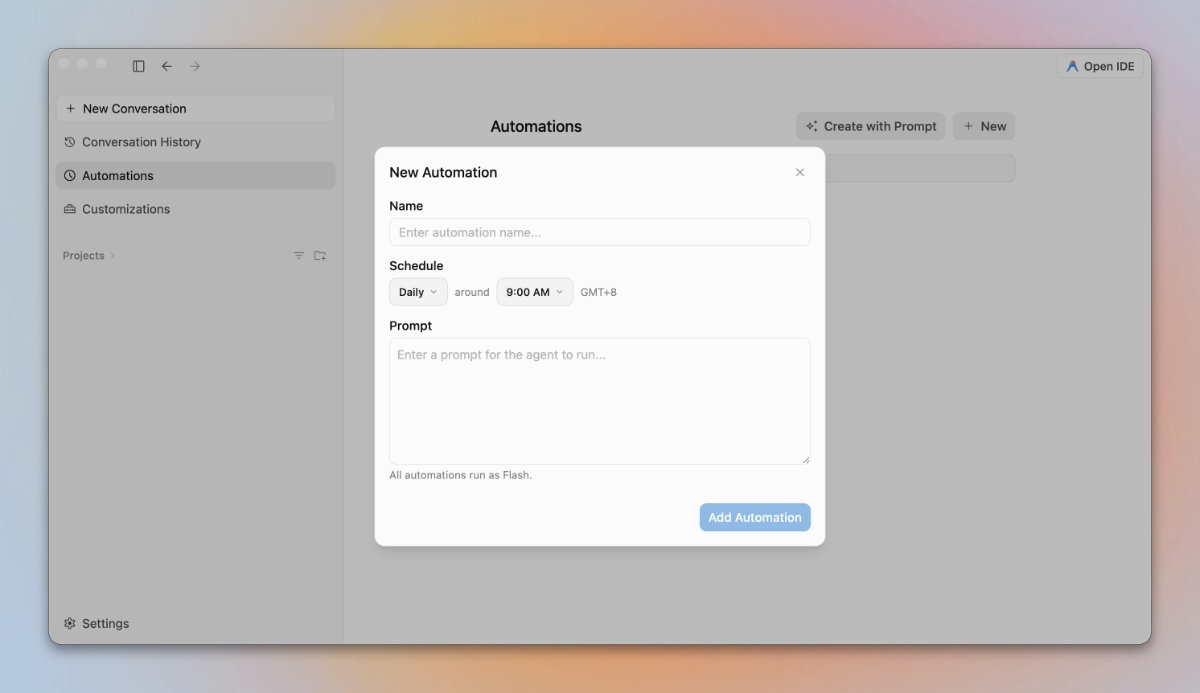
Manual configuration remains simple, requiring just three fields:
| Field | Description |
|---|---|
| Name | The name of the automation task |
| Schedule | Frequency (e.g., Daily), execution time, and local timezone (e.g., GMT+8) |
| Prompt | The instructions for the agent to execute |
Note the fine print: All automations run as Flash. All background automations currently run on Gemini Flash. Keep instructions focused on lightweight, repeatable tasks (e.g., "summarize daily updates", "check CLI version bumps") rather than heavy architectural reasoning.
📌 Common Use Case A daily 7:00 AM automation that inspects CLI releases (such as Codex, AGY, Grok) and automatically triggers updates if new versions are available.
3. Collapsible Agent Operation Rows
Previously, when an agent chained file edits, bash commands, and file reads between responses, terminal logs often cluttered the chat, pushing final answers off-screen.
Now, these actions are consolidated into a single collapsible row with a concise summary. You can expand the row whenever you need to inspect raw execution details.
Timestamps under agent messages also display relative time by default (e.g., 5m ago), revealing the exact ISO timestamp on hover.
4. Quality of Life Refinements
- Gruvbox Material Theme: Added both Light and Dark variants with matching syntax highlighting palettes.
- Image-Aware Titles: Auto-generated titles now inspect images included in your initial message; attachment-only messages also get meaningful titles.
- Windows / Linux: Clicking the top-left Antigravity window icon starts a new conversation immediately.
- macOS Permissions: If macOS security blocks Antigravity from reading drag-and-dropped folders, the UI directs you directly to
System Settings > Privacy & Security > Files and Folders, and the agent won't falsely claim the file does not exist.
5. Key Bug Fixes
Among the 14 bug fixes in this release, several resolve high-impact edge cases:
Crash & Error Fixes:
- Fixed a bug where reading truncated or incomplete MP4/MOV videos permanently broke subsequent messages in the conversation.
- Fixed an issue where saving settings files via Windows Notepad or PowerShell prepended invisible BOM characters, invalidating settings.
UI & State Fixes:
- Fixed switched models in one thread occasionally showing incorrectly when switching between conversations.
- Fixed non-text artifacts (PDF, Word, Excel, PowerPoint) rendering as raw text instead of displaying proper download cards.
- Fixed missing file tree sidebars in standalone conversations outside defined workspaces.
- Fixed jumping to the page top when toggling focus between Markdown preview, artifacts, and diff reviewers.
- Fixed holding
Cmd+B/Ctrl+Brepeatedly toggling the sidebar uncontrollably. - Fixed selecting text and pressing
Cmd+L/Ctrl+Lfailing to focus the prompt input.
Other Fixes:
- Fixed attachments uploaded from the homepage unexpectedly reappearing in new conversation inputs.
- Restored syntax highlighting for Rust (
.rs) files and codeblocks. - Fixed plugin updates on Windows failing when background processes were still holding open handles.
Summary
Cmd+Kfull-text search across all conversation contents.- Scheduled Tasks transformed into Automations with
Run NowandCreate with Prompt. - Consolidated, collapsible agent action rows for cleaner chat threads.
Full release notes are available on the official Releases page.
Recent Version Highlights
| Version | Focus |
|---|---|
| v2.19.1 | Subagent direct messaging, Markdown to PDF export, conversation-only undo |
| v2.18.1 | Customizations tab and Plugin Marketplace |
| v2.17.0 | /plan workflow, dedicated 20,000 token rule budgets, Plan Review Policy |
| v2.16.0 | WSL support, Office attachments, subagent real-time status cards |
| v2.15.1 | Windows Sandbox |